Ridebird

Never gamble on fuel in the mountains

Ridebird plans a motorcycle trip a day at a time, then tells you which stretch of the route has no fuel on it — and which station fixes that. Every petrol station in Thailand is already on the phone before you leave.

TestFlight beta coming sooniPhone · iOS 26 and later

The problem this app was built for

Know before you go which stretch has no fuel

Tell Ridebird how far your tank goes and how much of it you want to hold back. What's left is your planning range, and every stretch of the trip is measured against it — a stretch being the run from one fuel stop to the next. Anything longer than the tank is flagged while you're still at the kitchen table.

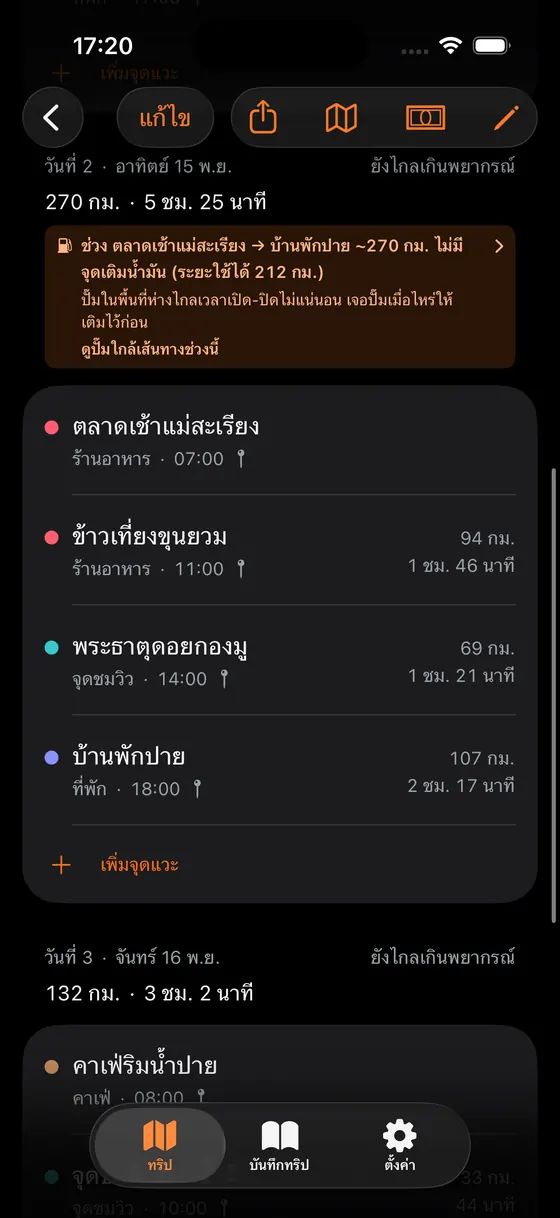
A real trip from the app: Mae Hong Son loop, day 2 · Mae Sariang → Pai
As plannedPlanning range 212 km

270 km with no fuel stop — 58 km past the range

Fill up at Khun Yuam

94 km, then 176 km — both inside the tankFixes it

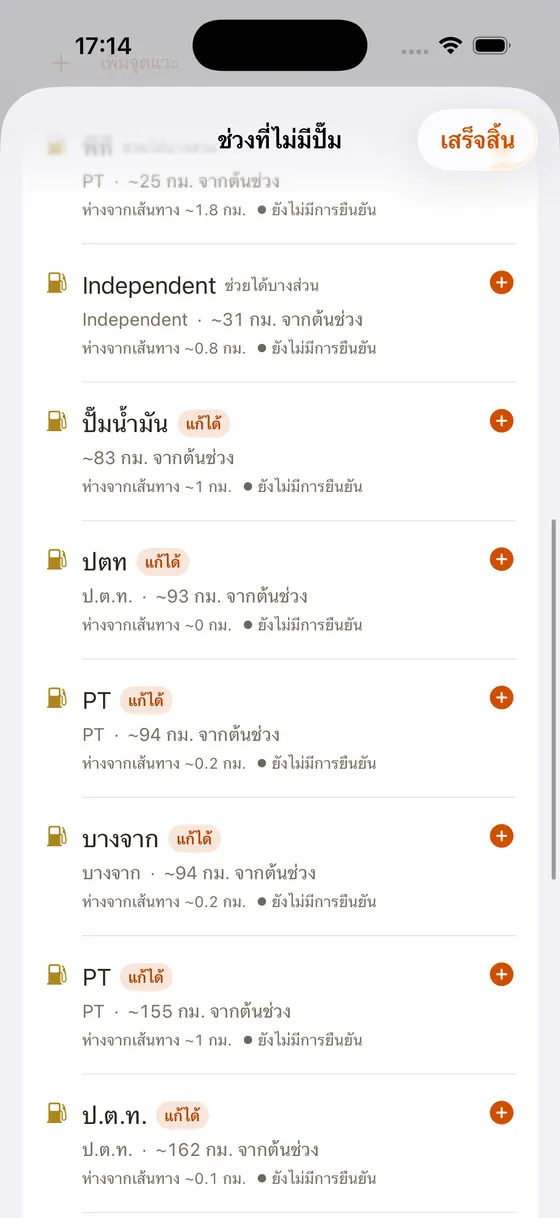
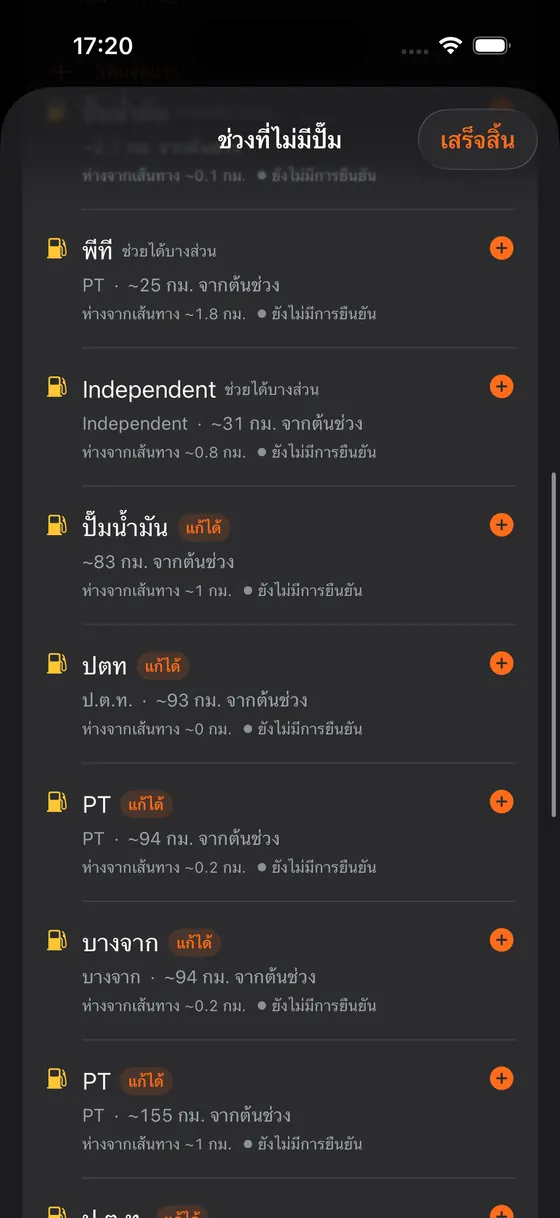
And it doesn't leave you to fix it alone. Ridebird lists the stations near that stretch from the 7,789 that ship inside the app, and marks “Fixes it” only on the ones that put every run of that day back inside the tank. The ones that only shorten the problem say so.

The trip screen warning that day 2 runs 270 km with no fuel stop
Stations near the route, with the ones that solve the problem badged Fixes it

And once you are already out there, low, with no signal — open “Petrol near me”. Ridebird orders the nearest stations from where you are standing, widens the search when there is nothing close, and tells you which of them the fuel you have left can actually reach. None of it needs a connection, because every station is already on the phone.

What else it already does

Plan

A day at a time, and the whole route at once

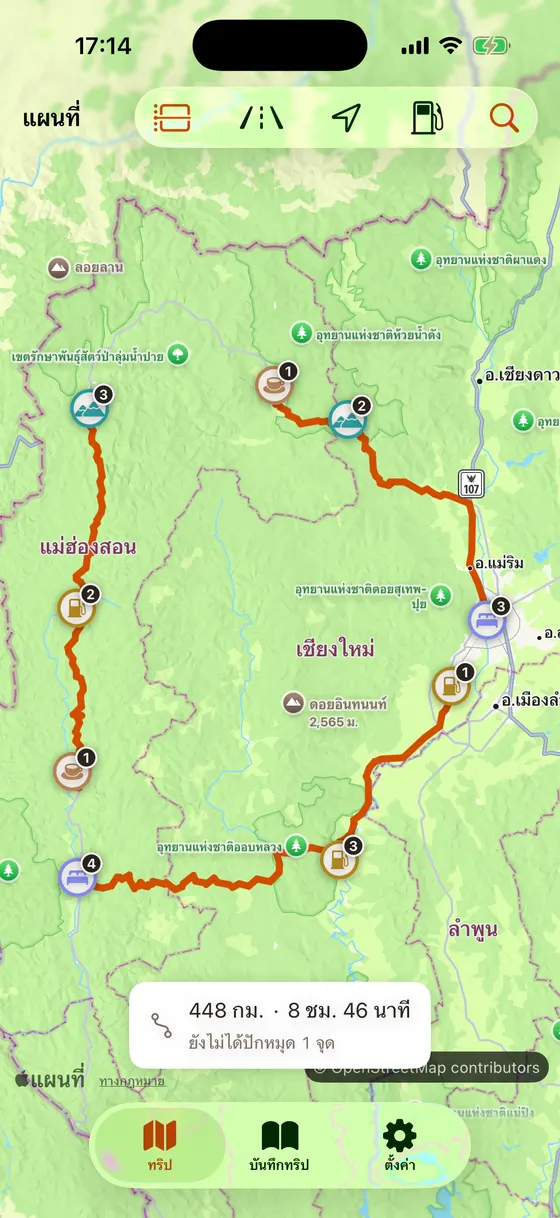
Add stops by what they are — fuel, cafe, stay, viewpoint, food, repair — and drag them into order. Every leg gets its distance and riding time, and a day you have overloaded says so. Switch the day to a timeline for a running clock down the side — roughly what time you reach each stop — and every pin on the map carries its number in the day. If a leg's distance was worked out over a motorway or expressway motorcycles may not use, that gets said too — the routing draws a line for a car, not for your bike. And where the road offers more than one way, open a leg's alternates, compare distance and time, and pick the road you actually want — the totals, the budget and the GPX all follow your choice.
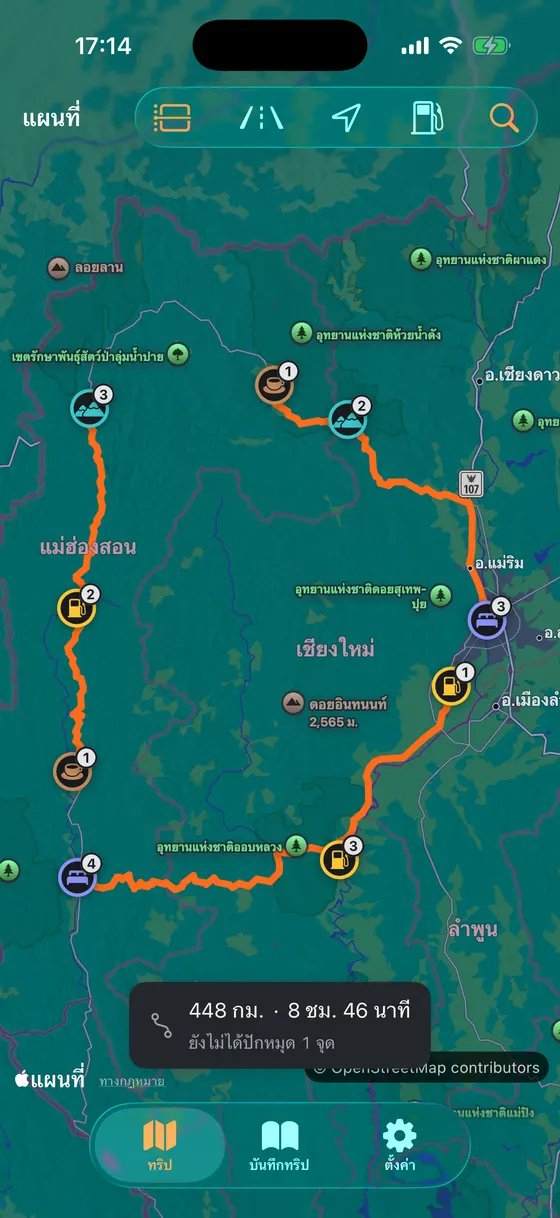
The in-app map showing the Mae Hong Son loop drawn along the real roads, with colour-coded stop pins numbered by their place in the day

Routes

115 Thai routes already worked out, so you never start from a blank page

A hand-curated library of 115 trips across 68 provinces, already split into days with every stop pinned. Filter by region, theme, length and how hard the road is; sort by which route starts nearest to you, or narrow it to the ones that are at their best this month. Import one and it becomes your trip — yours to change from that second on.

115curated routes, shipped inside the app

Along the way

Cafes, viewpoints, places to stay — read along the day's route

Open it from any day and see what that day actually rides past — cafes, viewpoints and stays, in the order you'll pass them, each with how far off the route it sits. See one you like and a single tap puts it into the plan at the right point of the day. The whole library ships inside the app, so it opens on a mountain with no signal.

18,342cafes, viewpoints and stays, shipped inside the app

Daylight

Will today end before dark?

Give Ridebird the time you mean to leave and it works out when you arrive — the day's real riding time plus an allowance for the stops along the way — then measures that against sunset where the day actually ends. If you get in after dark it says so while you are still planning, and tells you what time to leave instead. It is solar position arithmetic: no connection, no download, nothing to keep up to date.

Island crossings

A leg on a boat is not a leg you rode

A Koh Chang or Koh Samui trip has one leg where the wheels never turn. Ridebird knows the 48 piers a motorcycle can roll onto and the 24 crossings between them, and keeps that leg properly apart from the riding — the hour on the boat never counts as fatigue, and the kilometres on the water never come out of the tank, but both stay in the day's clock in full, because a late boat meets the same sunset. Timetables it deliberately does not guess: real sailings move with the season and the sea, so the most honest thing the app can say is check the last boat before you leave.

48vehicle-ferry piers, shipped inside the app

When it doesn't go to plan

A bail-out plan, and an emergency card that works with no signal

Every day of the trip can show the hospitals, clinics, police and repair shops near the route — and, more usefully, the point on that day you are furthest from any help. That number never shows up in a list of stops, because nobody pins a stop in the middle of the empty part. The emergency card dials 1669, 1193, 1155 or 191, shows your coordinates to read out, carries the bike's papers, and has a Thai message you can hand to whoever is standing there to read for you.

5,271places to bail out to, shipped inside the app

National parks

Which days cross a park, and what the gate wants

Most Thai touring routes run through a national park, and the gate wants cash. Ridebird knows the boundary of all 133 gazetted parks, tells you which days of your trip cross which ones, and adds up how much cash to carry — counting the motorcycle fee as well as your own, which is the number most sources forget: Khao Yai is ฿60, not ฿40. Browse by province or by what's near you, and for the parks where we know where the office actually is, pin it as a stop. For the ones where we only know the rough area, the app says so instead of sending you into a forest.

133national parks, with boundaries and gate fees

Seasons

What the month you picked is actually like

A forecast answers "is it raining Thursday". It says nothing about a trip booked for March. Ridebird does: the northern burning season, the wet months for the region you are riding in, and the New Year and Songkran road-safety periods when the traffic is heavier, the drivers worse and every guesthouse full. The Andaman and Gulf coasts are kept apart, because their wet seasons are close to opposite. In the burning months, a riding day in the haze zones shows the live PM2.5 from the Pollution Control Department's nearest station — not just a calendar warning. And in the wet season, if the afternoon is going to rain, it tells you what time to leave to arrive before it.

Gloves on

A lock-screen widget, and your voice at the pump

The home-screen and lock-screen widget shows the next stop, how many are left and what time the sun goes down. On the day you actually ride, you can also pin the whole day to the Lock Screen as a Live Activity — the next stop and the fuel warning sit right there without unlocking. And standing at the pump in gloves, you can just say "log fuel in Ridebird" or "check in with Ridebird" — no unlocking, no opening the app. Nothing runs in the background: all of it shows what the app wrote last time you used it.

On the road

Know how far in you are, without being navigated

Open the app at a stop and see where you are on the day, how far the next stop still is, and — if you are standing at one — check in with a single tap. Once you have checked in somewhere with a planned time, it also says how many minutes ahead of or behind the plan you are running. Adding a stop right where you are is one button, rather than hunting for yourself on the map. All of it happens only while the app is open: nothing follows you in the background, and working out how far in you are reads only data already on the phone. If you have shared the trip as a link, you can also let whoever holds it see how far you have checked in — per trip, off unless you turn it on, and it carries the stops you checked in at, never your coordinates.

Budget

A trip budget that works out the fuel itself

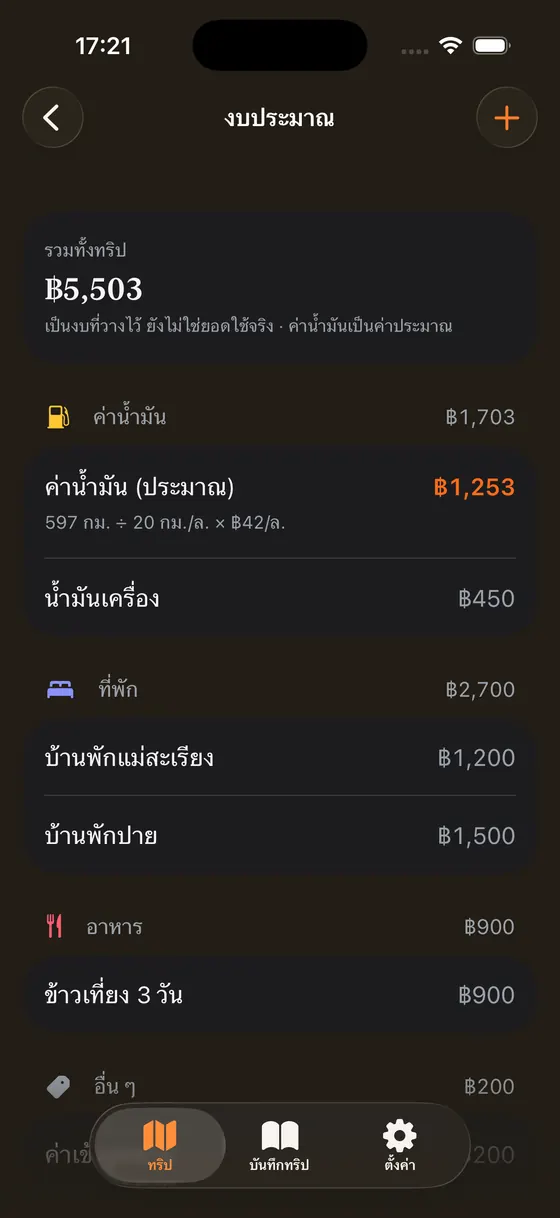
Fuel cost comes from the trip's real distance, divided by your bike's economy, times the price of the grade it burns — with the arithmetic on screen rather than a number that just appears. Beds, food and park fees you add yourself.

The budget screen showing the trip total and fuel worked out from distance

Garage

Every machine has its own numbers — and its own dates

Keep more than one — motorcycle, car, pickup, van — each with its own tank range, economy and idea of a long day, and every trip planned against the one it is for. Enter the odometer and Ridebird counts down oil, chain, pads and tyres against real intervals, keeps tax, PRB and insurance dates in view, and tells you in advance which of them the trip you are about to take will push past due — separating a paper that runs out before you leave from one that runs out on day three, which are different problems with different fixes.

Service book

What has actually been done to it — and a file that proves it

Every time you tap Done, Ridebird writes a line rather than overwriting the last one: the day, the reading, the shop, what went in, and photos of the receipt or the worn part. That becomes the machine's own timeline — the thing a buyer asks to see, and the thing you cannot reconstruct a year later. Export the whole book as a spreadsheet whenever you want it; it is yours, so it is free and always will be. Papers and time-based services can remind you 30 days, a week and the morning before they are due. Distance-based ones deliberately do not: the odometer is only as fresh as the last time you typed it, so those stay in the app rather than buzzing at you from a number that might be three months old. No cost fields anywhere — Ridebird records that the work happened, not what you paid for it.

Fuel

What your bike actually does per litre — your receipts already know

Log every fill-up — litres, baht, which station, what the odometer read — and Ridebird works out the real km/L between full tanks, alongside the cost per kilometre and what you have spent. When the measured figure disagrees with the one you planned with, it says so and offers to change it; it never rewrites it quietly, because that number decides whether you get warned about a stretch with no pumps. What counts as a full day gets the same treatment — measured against the days you really rode, then offered. And when a trip is two-up, one switch moves the range, the fuel and the length of a comfortable day together. Prices are kept per grade — all ten on the board, from E85 to the premium gasohol a big bike drinks — so gasohol and diesel stop being budgeted at the same one.

Journal

The trip is over. It hasn't gone anywhere

Tap any stop and write down what it was actually like, with up to six photos on each. Write it at the pump while it is happening, or in the guesthouse once the day is done — it saves as you type, so there is no button to forget. Notes and photos stay on the phone, read with no signal, and never overwrite the note you wrote while planning: those are two different things about the same place. Ridebird then sums the trip up itself — how many days, how many of your pinned stops you actually reached, and how far you really rode, counted from your check-ins rather than from the plan. Those two figures stay apart; neither is ever quietly presented as the other. When it is worth showing off, one tap turns it into a card you can post — and that card carries nothing about money. The route is shareable; the wallet is not.

All 77 provinces

A map of Thailand you can only colour in by riding

Every province a ridden day's route passes through gets coloured in on a map of Thailand inside the app. There is no tick-box anywhere: a province counts on evidence only — a check-in or a journal entry is the strong kind, a trip whose dates have already passed counts in a fainter shade, and a trip still ahead counts for nothing, however carefully it is pinned. All 77 boundaries ship inside the app, so the counting works with no signal and nothing ever leaves the phone. And whether you finish the country or just want to show where you are, one tap turns the map into a card ready to post.

77provinces, waiting to be coloured in

Hand off

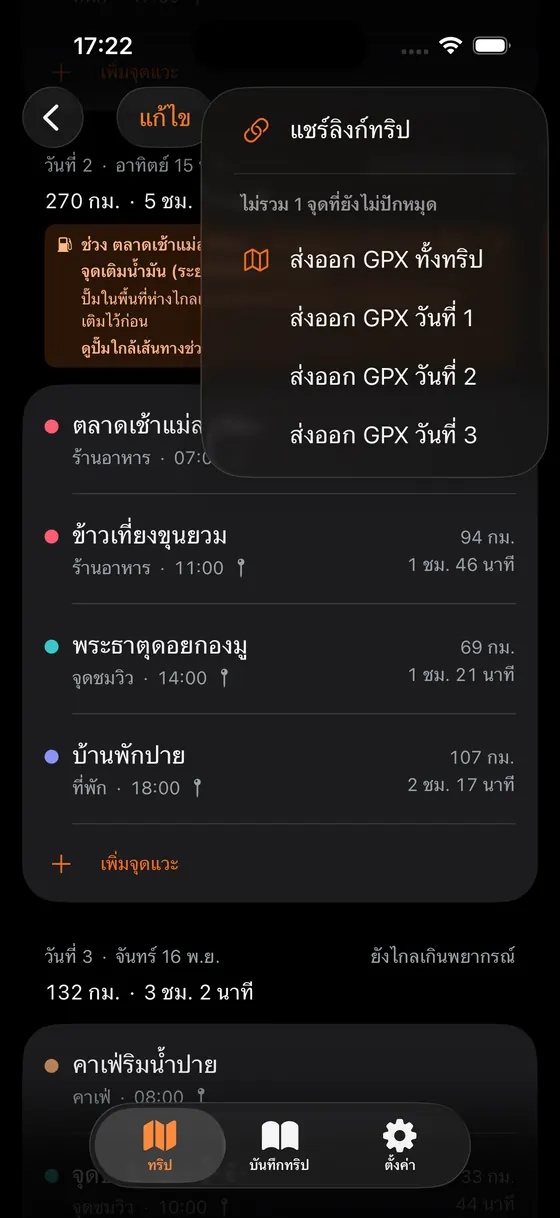
GPX for your device, and a button through to Maps

Export GPX for the whole trip or one day at a time, into Garmin or whatever you already use. For a leg you want turn-by-turn on, hand it to Google Maps or Apple Maps — Ridebird is a planner, not a navigator, deliberately.

The share menu offering a trip link and per-day GPX export

Offline

Still opens with no signal

The plan, the distances already measured, the budget, all 115 routes and all 7,789 stations sit on the phone before the wheels turn. Even finding the nearest pump to where you are standing works with no signal, because it reads what is already there rather than asking anyone. That and GPX export are free forever — they will never move behind a subscription.

7,789stations, shipped inside the app

Share

Send a link, nobody has to install anything

Share a trip as a read-only web page that opens on iPhone and Android alike. A friend without the app can download the GPX straight from that page into their Garmin. Turn the link off whenever you like — and the budget never travels with it. The route is shareable; your wallet isn't.

Open a real shared link →

Half past five at Kiew Lom. The sky hasn't turned yet and your hands are too cold to feel the bars.

Then the mist comes up the valley all at once.

Nobody standing there got lucky — they just knew the night before where they'd sleep, what time to leave, and where the last fuel was.

That is the part Ridebird does. The part before the wheels turn.

The in-app map showing the Mae Hong Son loop drawn along the real roads, with colour-coded stop pins numbered by their place in the day
Stations near the route, with the ones that solve the problem badged Fixes it

Light mode is not an afterthought — it is built to be read at a roadside stop in full sun.

The next trip starts the night before

Finish the planning then. The rest is riding.

TestFlight beta coming sooniPhone · iOS 26 and later